Short Description :
A system-wide DLL, implementing the Windows native API. This is the lowest layer of code which is still in user mode. Its most important role is to make the transition to kernel mode for system call invocation. NTDLL also implements the Heap Manager, the Image Loader and some part of the user-mode thread pool. Although the native API is mostly undocumented.
win32 api : http://undocumented.ntinternals.net/
Thursday, May 21, 2020

Sunday, March 8, 2020
Local Privilege Escalation in Metasploit Framework Application (Windows)
Version: Metasploit Framework - Rapid7 (Windows) 4.17.0
Operating System tested on: Windows 10 1909 (x64)
Vulnerability: Metasploit Framework - Rapid7 (Windows) Local Privilege Escalation through CWE-426(Untrusted Search Path)
When Metasploit Framework install in windows, that installation created 4 services.
Metasploit windows services are automatically run by default (I mean services start/stop by reboot).

Services are running automatic.

Then, I checked the processes of that 4 services at procmon . One of those 4 services which is (metasploitProSvc) is called/loaded taskkill.exe which doesn't exist from other folder with SYSTEM access when service is stop (or reboot PC).

......

then, i check the folder permission of taskkill.exe which doesn't exist.

So, authenticated users can access that folder. It mean, all the user (user/guest or admin) who can use metasploit framework in windows pc can exploit this bug.
Then, I created the payload file as taskkill.exe into the folder "C:\metasploit\postgresql\bin"

payload has been executed. B00M !!! we g0t system shell .
They acknowledged and appreciated.

logic bugs are fun.
happy hunting.
you can look up here if you're interested in hunting logical bugs.
https://github.com/sailay1996/awesome_windows_logical_bugs
Operating System tested on: Windows 10 1909 (x64)
Vulnerability: Metasploit Framework - Rapid7 (Windows) Local Privilege Escalation through CWE-426(Untrusted Search Path)
When Metasploit Framework install in windows, that installation created 4 services.
Metasploit windows services are automatically run by default (I mean services start/stop by reboot).

Services are running automatic.

Then, I checked the processes of that 4 services at procmon . One of those 4 services which is (metasploitProSvc) is called/loaded taskkill.exe which doesn't exist from other folder with SYSTEM access when service is stop (or reboot PC).

......

then, i check the folder permission of taskkill.exe which doesn't exist.

So, authenticated users can access that folder. It mean, all the user (user/guest or admin) who can use metasploit framework in windows pc can exploit this bug.
Then, I created the payload file as taskkill.exe into the folder "C:\metasploit\postgresql\bin"

payload has been executed. B00M !!! we g0t system shell .
They acknowledged and appreciated.

logic bugs are fun.
happy hunting.
you can look up here if you're interested in hunting logical bugs.
https://github.com/sailay1996/awesome_windows_logical_bugs
Friday, February 21, 2020
Local Privilege Escalation In EA's Origin Client
Product name: Origin Client (OriginThinSetup)
Product version : 10.5.63.37653
Operating System tested on: Windows 10 1909 (x64)
Vulnerability: Origin Client Service DACL Overwrite Elevation of Privilege
Description :
When origin client application is installed, it created 2 different services which are "origin client service" and "origin web helper service" with different privilege that're "NT AUTHORITY\SYSTEM" and "NT AUTHORITY\Local Service". And also that services could be run by everyone.
Then, I checked the processes of that 2 services at the process monitor (procmon) and I found some interesting thing that is "origin web helper service" create the file "C:\ProgramData\Origin\local.xml" even it doesn't exit in the folder "C:\ProgramData\Origin\" which can be control by Everyone:(F) . And then , "origin client service" set the permission SetSecurityFile(DACL) to "C:\ProgramData\Origin\local.xml" .
So, low privileged users can use this services to set permission (DACL) on High privileged files by creating symbolic link. Then, I used symboliclink-testing-tools which have been created by James Forshaw (@tiraniddo) from Project Zero to create symbolic link.
I created Hardlink on "C:\ProgramData\Origin\local.xml" to point the file "C:\windows\win.ini" which doesn't have access control by low privileged users. Then, I restart the service.
B00M !!! I can fully control on that privileged file "C:\windows\win.ini" .
To get SYSTEM shell with this bug, we can use "from-arbitrary-file-overwrite-to-system" of @decoder_it . I modified it as simple.
FileWrite Weapon: https://github.com/sailay1996/FileWrite2system
To Exploit this bug,
Create hardlink to file "C:\Windows\System32\DriverStore\FileRepository\prnms003.inf_amd64_e4ff50d4d5f8b2aa\Amd64\PrintConfig.dll", then you can get fully control access on that dll file PrintConfig.dll . After you get fully control , run that powershell script and you will get SYSTEM shell .
B00m !!!! You g0t SYSTEM shell.
And, I created the fully poc code for this bug.
https://github.com/sailay1996/origin_client_LPE
pwnedddd !!!! xD
Thanks for reading
@404death
Product version : 10.5.63.37653
Operating System tested on: Windows 10 1909 (x64)
Vulnerability: Origin Client Service DACL Overwrite Elevation of Privilege
Description :
When origin client application is installed, it created 2 different services which are "origin client service" and "origin web helper service" with different privilege that're "NT AUTHORITY\SYSTEM" and "NT AUTHORITY\Local Service". And also that services could be run by everyone.
 |
| Services Access Control |
 |
| create local.xml |
 |
| SetSecurityFile(DACL) |
So, low privileged users can use this services to set permission (DACL) on High privileged files by creating symbolic link. Then, I used symboliclink-testing-tools which have been created by James Forshaw (@tiraniddo) from Project Zero to create symbolic link.
I created Hardlink on "C:\ProgramData\Origin\local.xml" to point the file "C:\windows\win.ini" which doesn't have access control by low privileged users. Then, I restart the service.
 |
| Set permission(DACL) on privileged file. |
To get SYSTEM shell with this bug, we can use "from-arbitrary-file-overwrite-to-system" of @decoder_it . I modified it as simple.
FileWrite Weapon: https://github.com/sailay1996/FileWrite2system
To Exploit this bug,
Create hardlink to file "C:\Windows\System32\DriverStore\FileRepository\prnms003.inf_amd64_e4ff50d4d5f8b2aa\Amd64\PrintConfig.dll", then you can get fully control access on that dll file PrintConfig.dll . After you get fully control , run that powershell script and you will get SYSTEM shell .
 |
| nt authority\system |
B00m !!!! You g0t SYSTEM shell.
And, I created the fully poc code for this bug.
https://github.com/sailay1996/origin_client_LPE
 |
| SYSTEM |
pwnedddd !!!! xD
Thanks for reading
@404death
Monday, February 17, 2020
Local Privilege Escalation In Techsmith's Snagit
Product name : Snagit 2020
Product Version : 20.1.0.4965
Operating System tested on: Windows 10 1909 (x64)
Vulnerability: Snagit Local Privilege Escalation through repairing msi installer package
Description :
After the Techsmith's Snagit Application is installed on Windows, an msi file is added to the “c:\windows\installer”(hidden by default) directory. Some of the .msi files in there will auto-elevate when you run them. They do not prompt, even on non-admin which have been discovered by @sandboxescaper . And also the msi installer package of techsmith corporation doesn't need to run by admin. So, even users can run installer file, doing file operation at higher privilege with no prompts required.
About bug,
after snagit application installed on windows, a random name *.msi file is added to "C:\windows\installer" directory. Then you can find that techsmith's installer package file in "C:\windows\installer" by using explorer.
 Then,
Then,
I repair that *.msi file with "C:\windows\installer> msiexec /fa 169a4170.msi" via low privilege account (non admin) and look at the process monitor (procmon) to check the processes of repairing Techsmith installer package.
then, check process monitor

and I found some interested things which are msiexec is WriteFiles into the Folder "C:\ProgramData\TechSmith\Snagit 20\" and SetSecurityFile to RegInfo.ini , PrinterPortFile with High privilege SYSTEM access which can be controlled by Everyone.
Then, I used symboliclink-testing-tools which have been created by James Forshaw (@tiraniddo) from Project Zero to create symbolic link.
I created Hardlink to the file "C:\windows\win.ini" which doesn't have access control by low privilege user and repairing the installer package again by running "msiexec /fa 169a4170.msi"
Then, created hardlink to that win.ini and repaired.
After the repairing is finished, the file "C:\windows\win.ini" can be access controlled by Everyone.
B00M !!! xD I can fully control that file.
To get SYSTEM shell with that bug, we can use "from-arbitrary-file-overwrite-to-system" of @decoder_it .
I modified it as simple.
FileWrite Weapon: https://github.com/sailay1996/FileWrite2system
To Exploit this bug,
Create hardlink to file "C:\Windows\System32\DriverStore\FileRepository\prnms003.inf_amd64_e4ff50d4d5f8b2aa\Amd64\PrintConfig.dll", then you can get fully control access on that dll file PrintConfig.dll . After you get fully control , run that powershell script and you will get SYSTEM shell .
B00m !!!! You g0t SYSTEM shell.
Thanks for reading.
@404death
One click poc comming soon for this bug.
https://github.com/sailay1996
Product Version : 20.1.0.4965
Operating System tested on: Windows 10 1909 (x64)
Vulnerability: Snagit Local Privilege Escalation through repairing msi installer package
Description :
After the Techsmith's Snagit Application is installed on Windows, an msi file is added to the “c:\windows\installer”(hidden by default) directory. Some of the .msi files in there will auto-elevate when you run them. They do not prompt, even on non-admin which have been discovered by @sandboxescaper . And also the msi installer package of techsmith corporation doesn't need to run by admin. So, even users can run installer file, doing file operation at higher privilege with no prompts required.
About bug,
after snagit application installed on windows, a random name *.msi file is added to "C:\windows\installer" directory. Then you can find that techsmith's installer package file in "C:\windows\installer" by using explorer.

I repair that *.msi file with "C:\windows\installer> msiexec /fa 169a4170.msi" via low privilege account (non admin) and look at the process monitor (procmon) to check the processes of repairing Techsmith installer package.
 |
| low privilege account(Non Admin) |
 |
| Repair Techsmith's installer package |

and I found some interested things which are msiexec is WriteFiles into the Folder "C:\ProgramData\TechSmith\Snagit 20\" and SetSecurityFile to RegInfo.ini , PrinterPortFile with High privilege SYSTEM access which can be controlled by Everyone.
 |
| Everyone:(F) Full control |
Then, I used symboliclink-testing-tools which have been created by James Forshaw (@tiraniddo) from Project Zero to create symbolic link.
I created Hardlink to the file "C:\windows\win.ini" which doesn't have access control by low privilege user and repairing the installer package again by running "msiexec /fa 169a4170.msi"
 |
| Access is denied by low privilege account |
 |
| Created Hardlink and repair msi |
 |
| C:\windows\win.in Everyone:(F) |
To get SYSTEM shell with that bug, we can use "from-arbitrary-file-overwrite-to-system" of @decoder_it .
I modified it as simple.
FileWrite Weapon: https://github.com/sailay1996/FileWrite2system
To Exploit this bug,
Create hardlink to file "C:\Windows\System32\DriverStore\FileRepository\prnms003.inf_amd64_e4ff50d4d5f8b2aa\Amd64\PrintConfig.dll", then you can get fully control access on that dll file PrintConfig.dll . After you get fully control , run that powershell script and you will get SYSTEM shell .
|
| nt authority\system |
B00m !!!! You g0t SYSTEM shell.
Thanks for reading.
@404death
One click poc comming soon for this bug.
https://github.com/sailay1996
Local Privilege Escalation In Techsmith's Camtasia
Product name : Camtasia 2019
Product Version : 19.0.9.17643
Operating System tested on: Windows 10 1909 (x64)
Vulnerability: Camtasia Local Privilege Escalation through repairing msi installer package
Description:
This Bug is exactly same as previous blog post which is Snagit Privilege Escalation.
Vuln File : "C:\ProgramData\TechSmith\Camtasia Studio 19\RegInfo.ini"
You can exploit by creating hardlink like previous Snagit Privilege Escalation with the same way.
Thanks for reading.
@404death
Product Version : 19.0.9.17643
Operating System tested on: Windows 10 1909 (x64)
Vulnerability: Camtasia Local Privilege Escalation through repairing msi installer package
Description:
This Bug is exactly same as previous blog post which is Snagit Privilege Escalation.
Vuln File : "C:\ProgramData\TechSmith\Camtasia Studio 19\RegInfo.ini"
 |
| Vuln File |
 |
| B00M !!! |
@404death
Friday, February 7, 2020
Privilege Escalation ( FileWrite eop) in AMD User Experience Program Launcher from Radeon Software
Version: AMD User Experience Program Launcher old version, (I forgot to snap).
Operating System tested on: Windows 10 1909 (x64)
Vulnerability: AMD User Experience Program Launcher from Radeon Software Local Privilege Escalation through insecure file move
In these days,
I'm always look at the process monitor (procmon) and I found something which is interesting to me. That something which I found is the processes of AMD User Experience Program Launcher service.
Vulnerability Overview
AMD User Experience Program Launcher service which is auto start after PC reboot, it service run with AUEPLauncher.exe and that loaded AUEPMaster.exe . And it check 3 folders which are inside "C:\ProgramData\AMD\PPC" after about 30 seconds when service started.

that 3 folders are "C:\ProgramData\AMD\PPC\upload\*" , "C:\ProgramData\AMD\PPC\temp\*" and "C:\ProgramData\AMD\PPC\send\*".

and then "C:\ProgramData\AMD\PPC" can be accessed by buildin user with FullControl and also above 3 folders.
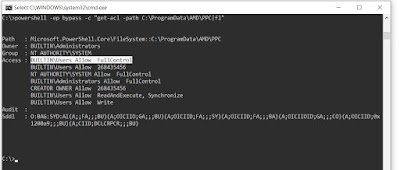
then, I created test file in temp folder "C:\ProgramData\AMD\PPC\temp" and restart the service and I check the procmon again. And I noticed some interested processes.

When I created file in temp folder "C:\ProgramData\AMD\PPC\temp\hellothere.txt", that created file change (as gz) in "C:\ProgramData\AMD\PPC\temp\hellothere.txt.gz" and then
moved (SetRenameInformationFile) into *send* folder "C:\ProgramData\AMD\PPC\send\hellothere.txt.gz" with SYSTEM privilege which can be Full controlled by BUILDIN\Users .
Why is this interesting? This presents the opportunity to use Symbolic Links during the move file operation to accomplish a privileged file write. How you might ask? The workflow would be like so:
Create the file in temp folder "C:\ProgramData\AMD\PPC\send\eop_filewrited.pwn" and it will move to send folder as gz file "C:\ProgramData\AMD\PPC\send\eop_filewrited.pwn.gz".
So, create a Symbolic Link on "C:\ProgramData\AMD\PPC\send\eop_filewrited.pwn.gz" that points to "C:\Windows\System32\evil_filewrited.txt" It should be noted that "C:\Windows\System32\evil_filewrited.txt" doesn't exist. And It's will write as C:\Windows\System32\evil_filewrited.txt with SYSTEM privilege which can be FullControl accessed by users.
Symbolic link:

recommend to read about symlink: James Forshaw's A Link to the past .
I used symboliclink-testing-tools which have been created by James Forshaw (@tiraniddo) from Project Zero.
Poc:
echo test123 > C:\ProgramData\AMD\PPC\temp\eop_filewrited.pwn
del /q C:\ProgramData\AMD\PPC\send\*
rmdir /q C:\ProgramData\AMD\PPC\send
CreateSymlink.exe C:\ProgramData\AMD\PPC\send\eop_filewrited.pwn.gz C:\windows\system32\evil_filewrited.txt
and restart the service (or reboot).

wait about 30 seconds after service restarted.

Get FullControl access on "C:\windows\system32\evil_filewrited.txt".
Then, I created the exploit poc script and I used @itm4n's UsoDllLoader as a privileged filewrite weapon to get system shell.
my poc script: https://github.com/sailay1996/amd_eop_poc

B00M !!!
logic bugs are fun.
happy hunting.
you can look up here if you're interested in hunting logical bugs.
https://github.com/sailay1996/awesome_windows_logical_bugs
Operating System tested on: Windows 10 1909 (x64)
Vulnerability: AMD User Experience Program Launcher from Radeon Software Local Privilege Escalation through insecure file move
In these days,
I'm always look at the process monitor (procmon) and I found something which is interesting to me. That something which I found is the processes of AMD User Experience Program Launcher service.
Vulnerability Overview
AMD User Experience Program Launcher service which is auto start after PC reboot, it service run with AUEPLauncher.exe and that loaded AUEPMaster.exe . And it check 3 folders which are inside "C:\ProgramData\AMD\PPC" after about 30 seconds when service started.

auto start service

and then "C:\ProgramData\AMD\PPC" can be accessed by buildin user with FullControl and also above 3 folders.

then, I created test file in temp folder "C:\ProgramData\AMD\PPC\temp" and restart the service and I check the procmon again. And I noticed some interested processes.

When I created file in temp folder "C:\ProgramData\AMD\PPC\temp\hellothere.txt", that created file change (as gz) in "C:\ProgramData\AMD\PPC\temp\hellothere.txt.gz" and then
moved (SetRenameInformationFile) into *send* folder "C:\ProgramData\AMD\PPC\send\hellothere.txt.gz" with SYSTEM privilege which can be Full controlled by BUILDIN\Users .
Why is this interesting? This presents the opportunity to use Symbolic Links during the move file operation to accomplish a privileged file write. How you might ask? The workflow would be like so:
Create the file in temp folder "C:\ProgramData\AMD\PPC\send\eop_filewrited.pwn" and it will move to send folder as gz file "C:\ProgramData\AMD\PPC\send\eop_filewrited.pwn.gz".
So, create a Symbolic Link on "C:\ProgramData\AMD\PPC\send\eop_filewrited.pwn.gz" that points to "C:\Windows\System32\evil_filewrited.txt" It should be noted that "C:\Windows\System32\evil_filewrited.txt" doesn't exist. And It's will write as C:\Windows\System32\evil_filewrited.txt with SYSTEM privilege which can be FullControl accessed by users.
Symbolic link:

recommend to read about symlink: James Forshaw's A Link to the past .
I used symboliclink-testing-tools which have been created by James Forshaw (@tiraniddo) from Project Zero.
Poc:
echo test123 > C:\ProgramData\AMD\PPC\temp\eop_filewrited.pwn
del /q C:\ProgramData\AMD\PPC\send\*
rmdir /q C:\ProgramData\AMD\PPC\send
CreateSymlink.exe C:\ProgramData\AMD\PPC\send\eop_filewrited.pwn.gz C:\windows\system32\evil_filewrited.txt
and restart the service (or reboot).

wait about 30 seconds after service restarted.

Get FullControl access on "C:\windows\system32\evil_filewrited.txt".
Then, I created the exploit poc script and I used @itm4n's UsoDllLoader as a privileged filewrite weapon to get system shell.
my poc script: https://github.com/sailay1996/amd_eop_poc

B00M !!!
logic bugs are fun.
happy hunting.
you can look up here if you're interested in hunting logical bugs.
https://github.com/sailay1996/awesome_windows_logical_bugs
Another Privilege Escalation ( FileWrite eop) in AMD User Experience Program Launcher from Radeon Software (CVE-2020-8950)
Version: AMD User Experience Program Launcher 1.0.0.1 (latest)
Operating System tested on: Windows 10 1909 (x64)
Vulnerability: RAMD User Experience Program Launcher from Radeon Software Local Privilege Escalation through insecure file move
In previous blog post, old version which I don't know (becoz I forgot to snap/check) AMD User Experience Program Launcher service can get LPE. But, when I updated Radeon Software , it's also update and can't access fullcontrol the folder "C:\ProgramData\AMD\PPC" by buildin users And previous eop technique doesn't work.

Then, I try to escape again on that lpe bug. So, I check again not to miss out the processes of that service on process monitor (procmon). But I noticed that buildin users can still have write access on that 3 folder .

Previous blog post's lpe technique doesn't work because of I can't control send folder with fullcontrol access. And even there is no file in "send" folder "C:\ProgramData\AMD\PPC\send"
and even I can symlink , *.gz file write in send folder have not fully access with buildin users.

So, I try to escape on that bug with other techniques. Then, I checked the processes of amd service by creating a file in *upload* folder "C:\ProgramData\AMD\PPC\upload" and restart the service.

Ah ! I found interested processes again at procmon which is when I create a file in *upload* folder "C:\ProgramData\AMD\PPC\upload", a file "C:\ProgramData\AMD\PPC\upload\hello123.txt" which I created is moved (SetRenameInformationFile) to *temp* folder as "C:\ProgramData\AMD\PPC\temp\A39F24CA-A49E-43E1-B078-2FE6809835F2_hello123.txt" and change gz file "C:\ProgramData\AMD\PPC\temp\A39F24CA-A49E-43E1-B078-2FE6809835F2_hello123.txt.gz". Then, moved again temp folder from "send" folder "C:\ProgramData\AMD\PPC\temp\A39F24CA-A49E-43E1-B078-2FE6809835F2_hello123.txt.gz" . Flow like below :
Files operation flow:
C:\ProgramData\AMD\PPC\upload\hello123.txt (created file)
C:\ProgramData\AMD\PPC\temp\A39F24CA-A49E-43E1-B078-2FE6809835F2_hello123.txt (moved file from upload)
C:\ProgramData\AMD\PPC\temp\A39F24CA-A49E-43E1-B078-2FE6809835F2_hello123.txt.gz (changed to *.gz )
C:\ProgramData\AMD\PPC\send\A39F24CA-A49E-43E1-B078-2FE6809835F2_hello123.txt.gz (moved from temp)
Then, I want to define this keyword "A39F24CA-A49E-43E1-B078-2FE6809835F2" which is dynamic or static. So, I created another 3 files as 1.txt, 2.txt, 3.txt into upload folder "C:\ProgramData\AMD\PPC\upload" then checked the processes again.

And I found the processes which I want to define. It's static keyword "A39F24CA-A49E-43E1-B078-2FE6809835F2" (Base on PC). You can check or define by creating a file in upload and then checking *send* folder . C:\>dir C:\ProgramData\AMD\PPC\send . Thus, if I created a filename as "evil.txt" in *upload* folder "C:\ProgramData\AMD\PPC\upload\evil.txt", it's will move to *temp* folder as C:\ProgramData\AMD\PPC\temp\A39F24CA-A49E-43E1-B078-2FE6809835F2_evil.txt . It's interesting.

So, I checked the permission of file from "temp" folder "C:\ProgramData\AMD\PPC\temp\A39F24CA-A49E-43E1-B078-2FE6809835F2_hello123.txt" by holding with SetOpLock.exe of James Forshaw (@tiraniddo) .

I noticed the permission of file "from" temp folder. "localhost\user Allow FullControl" . This mean, the permission of the user who created in *upload* folder with FullControl access.
Example.
if you created the file in *upload* folder "C:\ProgramData\AMD\PPC\upload" with localhost\testuser , the permission of file from *temp* folder "C:\ProgramData\AMD\PPC\temp\A39F24CA-A49E-43E1-B078-2FE6809835F2_hello123.txt" will be "localhost\testuser Allow FullControl".
Then, I tried to exploit it by creating symboliclink the file from *temp* folder.
POC:
I created a file in upload folder as evil_test.txt and it'll move to temp folder as C:\ProgramData\AMD\PPC\temp\A39F24CA-A49E-43E1-B078-2FE6809835F2_evil_test.txt . Then , I create symlink on "C:\ProgramData\AMD\PPC\temp\A39F24CA-A49E-43E1-B078-2FE6809835F2_evil_test.txt " to point "C:\windows\system32\evil_filewrited.txt" which doesn't default exist in system32 folder.

Then I restart the service (or reboot) and I found that evil_filewrited.txt has been created in system32 folder.

And I checked the permission of that file which can be modified or not. Ah , permission of created file in system32 folder "C:\windows\system32\evil_filewrited.txt" is "localhost\testuser Allow FullControl" access. This mean like, the permission of created file who created with localhost\testuser access in "upload" folder. So , "C:\windows\system32\evil_filewrited.txt" will get fullcontrol accessed by file creator in *upload* folder.
On the other hand of exploit technique,
if I create a file with file data, example:
echo pwned > C:\ProgramData\AMD\PPC\upload\hello123.txt
then create symlink on system32 folder and when I check the file from system32 folder
more "C:\windows\system32\evil_filewrited.txt"
pwned
I saw the data from the file hello123.txt which I created in upload folder. And also I can modify that file with fullcontrol access.
So, I created another lpe exploit poc script for this by using @itm4n's UsoDllLoader as a privileged filewrite weapon to get system shell.
my poc script: https://github.com/sailay1996/amd_eop_poc

B00M !!!
logic bugs are fun.
happy hunting.
you can look up here if you're interested in hunting logical bugs.
https://github.com/sailay1996/awesome_windows_logical_bugs
Operating System tested on: Windows 10 1909 (x64)
Vulnerability: RAMD User Experience Program Launcher from Radeon Software Local Privilege Escalation through insecure file move
In previous blog post, old version which I don't know (becoz I forgot to snap/check) AMD User Experience Program Launcher service can get LPE. But, when I updated Radeon Software , it's also update and can't access fullcontrol the folder "C:\ProgramData\AMD\PPC" by buildin users And previous eop technique doesn't work.

Then, I try to escape again on that lpe bug. So, I check again not to miss out the processes of that service on process monitor (procmon). But I noticed that buildin users can still have write access on that 3 folder .

and even I can symlink , *.gz file write in send folder have not fully access with buildin users.

So, I try to escape on that bug with other techniques. Then, I checked the processes of amd service by creating a file in *upload* folder "C:\ProgramData\AMD\PPC\upload" and restart the service.

Ah ! I found interested processes again at procmon which is when I create a file in *upload* folder "C:\ProgramData\AMD\PPC\upload", a file "C:\ProgramData\AMD\PPC\upload\hello123.txt" which I created is moved (SetRenameInformationFile) to *temp* folder as "C:\ProgramData\AMD\PPC\temp\A39F24CA-A49E-43E1-B078-2FE6809835F2_hello123.txt" and change gz file "C:\ProgramData\AMD\PPC\temp\A39F24CA-A49E-43E1-B078-2FE6809835F2_hello123.txt.gz". Then, moved again temp folder from "send" folder "C:\ProgramData\AMD\PPC\temp\A39F24CA-A49E-43E1-B078-2FE6809835F2_hello123.txt.gz" . Flow like below :
Files operation flow:
C:\ProgramData\AMD\PPC\upload\hello123.txt (created file)
C:\ProgramData\AMD\PPC\temp\A39F24CA-A49E-43E1-B078-2FE6809835F2_hello123.txt (moved file from upload)
C:\ProgramData\AMD\PPC\temp\A39F24CA-A49E-43E1-B078-2FE6809835F2_hello123.txt.gz (changed to *.gz )
C:\ProgramData\AMD\PPC\send\A39F24CA-A49E-43E1-B078-2FE6809835F2_hello123.txt.gz (moved from temp)
Then, I want to define this keyword "A39F24CA-A49E-43E1-B078-2FE6809835F2" which is dynamic or static. So, I created another 3 files as 1.txt, 2.txt, 3.txt into upload folder "C:\ProgramData\AMD\PPC\upload" then checked the processes again.

And I found the processes which I want to define. It's static keyword "A39F24CA-A49E-43E1-B078-2FE6809835F2" (Base on PC). You can check or define by creating a file in upload and then checking *send* folder . C:\>dir C:\ProgramData\AMD\PPC\send . Thus, if I created a filename as "evil.txt" in *upload* folder "C:\ProgramData\AMD\PPC\upload\evil.txt", it's will move to *temp* folder as C:\ProgramData\AMD\PPC\temp\A39F24CA-A49E-43E1-B078-2FE6809835F2_evil.txt . It's interesting.

So, I checked the permission of file from "temp" folder "C:\ProgramData\AMD\PPC\temp\A39F24CA-A49E-43E1-B078-2FE6809835F2_hello123.txt" by holding with SetOpLock.exe of James Forshaw (@tiraniddo) .

I noticed the permission of file "from" temp folder. "localhost\user Allow FullControl" . This mean, the permission of the user who created in *upload* folder with FullControl access.
Example.
if you created the file in *upload* folder "C:\ProgramData\AMD\PPC\upload" with localhost\testuser , the permission of file from *temp* folder "C:\ProgramData\AMD\PPC\temp\A39F24CA-A49E-43E1-B078-2FE6809835F2_hello123.txt" will be "localhost\testuser Allow FullControl".
Then, I tried to exploit it by creating symboliclink the file from *temp* folder.
POC:
I created a file in upload folder as evil_test.txt and it'll move to temp folder as C:\ProgramData\AMD\PPC\temp\A39F24CA-A49E-43E1-B078-2FE6809835F2_evil_test.txt . Then , I create symlink on "C:\ProgramData\AMD\PPC\temp\A39F24CA-A49E-43E1-B078-2FE6809835F2_evil_test.txt " to point "C:\windows\system32\evil_filewrited.txt" which doesn't default exist in system32 folder.

Then I restart the service (or reboot) and I found that evil_filewrited.txt has been created in system32 folder.

And I checked the permission of that file which can be modified or not. Ah , permission of created file in system32 folder "C:\windows\system32\evil_filewrited.txt" is "localhost\testuser Allow FullControl" access. This mean like, the permission of created file who created with localhost\testuser access in "upload" folder. So , "C:\windows\system32\evil_filewrited.txt" will get fullcontrol accessed by file creator in *upload* folder.
On the other hand of exploit technique,
if I create a file with file data, example:
echo pwned > C:\ProgramData\AMD\PPC\upload\hello123.txt
then create symlink on system32 folder and when I check the file from system32 folder
more "C:\windows\system32\evil_filewrited.txt"
pwned
I saw the data from the file hello123.txt which I created in upload folder. And also I can modify that file with fullcontrol access.
So, I created another lpe exploit poc script for this by using @itm4n's UsoDllLoader as a privileged filewrite weapon to get system shell.
my poc script: https://github.com/sailay1996/amd_eop_poc

B00M !!!
logic bugs are fun.
happy hunting.
you can look up here if you're interested in hunting logical bugs.
https://github.com/sailay1996/awesome_windows_logical_bugs
Subscribe to:
Posts (Atom)
Privileged arbitrary file read (CVE-2020-16938) with The Sleuth Kit
After I read one of post from twitter which is about @jonasLyk's CVE-2020-16938 , I've some idea to do without using 7 zip file ma...

-
 I found one interesting post in medium which is here and i got some idea to bypass UAC . And I notice windows stor...
 -
 Version : AMD User Experience Program Launcher old version, (I forgot to snap). Operating System tested on : Windows 10 1909 (x64) Vulnera...
 -
 Version : AMD User Experience Program Launcher 1.0.0.1 (latest) Operating System tested on : Windows 10 1909 (x64) Vulnerability : RAMD U...